
Payment Plan
At OSUIT, students are automatically enrolled in a payment plan to help manage their tuition and fees over the semester.
How It Works
- Enrollment: If you have a balance due after the 20th of the first month of the semester (see table below), your remaining balance will be divided into equal payments.
- Payment Schedule: These payments are due on the 15th of the next three months.
- Student Responsibility: The automatic payment plan does not set up automatic payments. You are responsible for making each monthly payment.
- Note: If you pay your balance in full before the 20th of the month, nothing is required of you and you will not be put into a plan.
Payment Plan Walkthrough
Payment Plan Walk-through (pdf)
Financial Aid Impact
Any financial aid added to your account after the payment plan is set up will be evenly distributed across the remaining payments, reducing your monthly balance.
Due Dates
- Spring: February 15, March 15, and April 15
- Summer: June 15, July 15, and August 15
- Fall: October 15, November 15, and December 15
Payment Plan Benefits and Details
The payment plan provides peace of mind by eliminating the need to manually set up payments. Additionally, students save money since there is no setup fee, and no finance charges are applied if payments are made on time. However, late charges of 1.5 percent of the remaining balance will be added if payments are not made by the 20th of each month.
Students can also customize their payment plans. If you prefer to pay biweekly, extend payments over four months instead of three, or set up automatic payments, you can set this up through your O-Key account. These options are only available during the first month of the semester, so act quickly if you wish to use them.
On your statement, the payment plan will appear as a "Memo Item," listing future anticipated payments as credits. This will show your balance as zero, assuming payments are made on time. However, your "Current Billed Balance" indicates the actual amount due, so ensure to check it even if your "Total Amount Due" shows "$0."
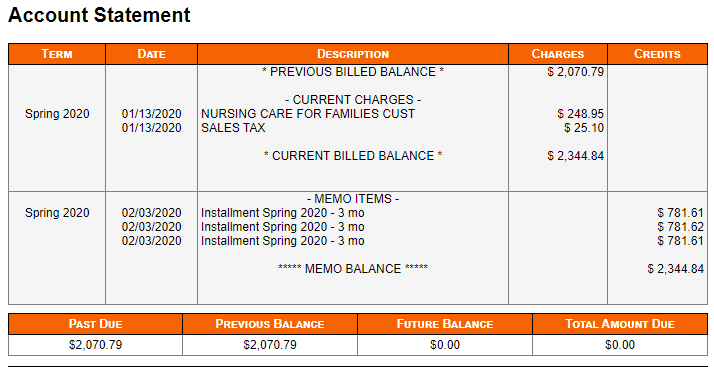
Anticipated future payments will be labeled as "Installment" in the description. This setup allows students to enroll for the next semester as long as they are current on their payment plan. Previously, students could not enroll unless their balance was under $200. Any missed payments or outstanding balances from previous semesters will appear in the "Past Due" section.
FAQ
-
What if I do not way to participate in the payment plan?
All students with a balance due to OSUIT after the 20 day of the month of the first month of school will be put on a payment plan (example below). To avoid a payment plan, your balance must be paid in full before the time to auto-enroll all students.
-
Can I setup automatic payments in the plan?
Before automatic enrollment, you have the option to set up your own payment plan with automatic payments through your O-Key account once charges are posted. If you are automatically enrolled in a payment plan, you will still be able to make payments through your O-Key account, but the automatic payment feature will not be available for you to set up. Important note: The college does not set up automatic payments for students. You are responsible for initiating any automatic payments and making sure your balance is paid each month.
-
How do I make payments once on the payment plan?
Payment Options:
Students can make payments online through their O-Key account:
- Debit/credit card: 2.85% processing fee applies.
- Checking/savings account: No fee.
Alternatively, you can pay by:
- Mail: Send a check or money order to the address listed under "Contact Us" on our website. Please allow 5-7 business days for processing.
- In-person: Pay by cash, check, or money order at the Bursar's Office.
Automatic Enrollment:
If you are automatically enrolled in a payment plan, you will not be enrolled in automatic payments. You must manually make your monthly payments through one of the options listed above.
-
What fees are there?
Payment Plan Information
Setup Fee: There is no fee to set up a payment plan.
Late Fees: A 1.5% late fee is assessed on the full remaining balance after the 15th of each month, starting in the second month of the semester. If your account is up-to-date, you will not be charged any late fees.
We encourage you to make your payments on time to avoid unnecessary fees.
-
How do scholarships and financial aid affect the process?
- Before Plan Setup: If your financial aid or scholarship funds are applied to your account before you set up a payment plan, your remaining balance will be divided into three equal monthly payments.
- After Plan Setup: If your financial aid or scholarship funds are applied after you've already set up a payment plan, the funds will be distributed evenly across your remaining payments, reducing the amount due each month. You will receive an email notification of any changes to your plan.
Important Note: It's always best to contact the financial aid office to understand how your specific aid package will impact your tuition and fees before setting up a payment plan.
-
Can a family member make a payment for me?
Authorized payers (i.e. parents, friends, sponsors, others) may be designated with their own login access when the student signs up for the plan.
-
Can I make payments before the monthly due date?
Yes! We encourage you to pay as you go as long as your payment is paid in full by the due date of the tenth. The automatic payment plan does not set up automatic payments; the student is responsible for making the payment monthly.
-
How will I be notified that a payment is due?
When you are enrolled into the payment plan, you will get an email at your university email giving you the details of your plan. You will also receive email reminders of upcoming payments and past due payments. Please remember you still receive monthly billing statement email notifications while on the Payment Plan for informational purposes.
-
Will I still receive a statement if I'm on a payment plan, and how will it reflect my installments?
Yes, you'll receive a monthly statement. Your payment plan installments will show as a credit in the "memo" section, usually resulting in a $0 current balance due. However, any outstanding charges not covered by the plan will appear in the "due" section. You can also view your account details anytime through your O-Key account at my.okstate.edu. If you have any questions, please contact us.
-
If my balance changes (i.e. add/drop class, housing changes, book charges) after my payment plan is set up, will the payment change?
Yes. You will receive an email notification of changes.
-
Does this payment plan report to my credit?
No, the payments will not report to your credit. As with any balance owed to OSUIT, failure to pay could lead to being sent to a third party collections agency andtheymay report to your credit. This is only in cases where students do not pay in a timely manner.
-
How does being on a payment plan work when enrolling for the next semester?
As long as you are making your payments as agreed, the payment plan will not affect you from being able to enroll. If you are not current on your payment plan, you will have to bring your account to a good standing (current) to enroll.
-
What happens if I do not pay in a timely manner?
Collection efforts will be made internally by OSUIT throughout the semester. If your balance is not paid in full by the final payment due date, you will be dropped from the next semester class. Reminder-The automatic payment plan does not set up automatic payments; the student is responsible for making the payment monthly.
-
What if I get dropped for failure to pay but want to re-enroll?
You can re-enroll once your balance is paid. Once dropped from a class, you may not be able to enroll in the same class.
The automatic payment plan does not set up automatic payments; the student is responsible for making the payment monthly.
If you have any questions or need further assistance, please do not hesitate to contact our office via email at okm-bursar@okstate.edu